
Domotz Collectors require minimal bandwidth for day-to-day operations. However, specific features and network size can impact data consumption.
Speed Tests (Highest Bandwidth Usage)
- Trigger: Every 6 hours (can also be triggered manually).
- Impact: Consumes the maximum available bandwidth for up to one minute during execution.
- Consumption: This is by far the most bandwidth-intensive operation. This functionality can be disabled from the Domotz App or WebApp.
To disable the Domotz Speedtest please access your Domotz Collector, then click on the Connectivity tab, then click on the Enable widget:
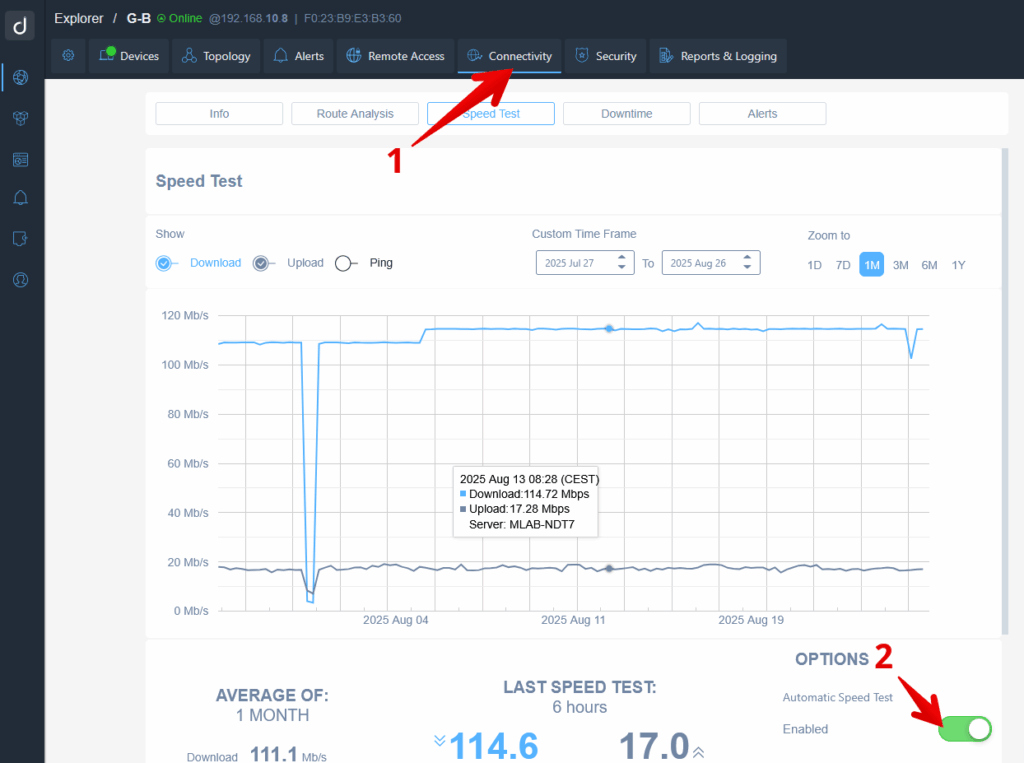
Connectivity Speed Test Overview
1. Navigate to the "Connectivity" section in the dashboard's top menu to access speed test features.
2. In the "Speed Test" tab, view the graph displaying download and upload speeds over a selected time frame. Ensure the "Download" option is selected to visualize download speed data.
3. Use the "Custom Time Frame" fields to adjust the start and end dates of the data displayed. For quick access, use the "Zoom to" options, such as 1M for one month.
4. Check "Options" on the right to ensure "Automatic Speed Test" is enabled. This setting automatically tests and records internet speeds at regular intervals.
Remote Connections
- Trigger: User-initiated (e.g., accessing a device web interface remotely or using VPN on Demand).
- Impact: Traffic generated during these sessions is routed through the WAN.
- Consumption: It depends entirely on user activity.
Regular Cloud Communication
- Trigger: This is in the continuous regular traffic between the Domotz Collector and the Domotz Cloud which allows Domotz to work properly.
- Impact: Scales with the number of monitored devices and frequency of changes (e.g., devices going up/down).
- Consumption: Very low compared to Speed Tests or remote sessions.
1. Regular Cloud Communication on Large Networks
- 320 IP devices
- 200 gateway-connected devices
- 100 managed devices (10 monitored metrics per device)
- 8 × 24-port managed switches (16 monitored metrics per port)
Daily Traffic: ~40 MB
2. Regular Cloud Communication on Medium Networks
- 160 IP devices
- 50 managed devices (10 monitored metrics per device)
- 4 × 24-port managed switches (16 monitored metrics per switch port)
Daily Traffic: ~20 MB
3. Regular Cloud Communication on Small Networks
- 30 IP devices
- 10 managed devices (10 monitored metrics per device)
- 1 × 24-port managed switch
Daily Traffic: ~1 MB