

The May 2025 update introduces expanded MIB support, enhancements to Collector setup and scripting capabilities, and usability fixes across the Domotz platform. Key updates include support for TFTP functions in custom scripts, improved device status logic, and a more streamlined onboarding experience with SNMP credential setup.
This month also delivers multiple updates to Network Collector versions across all supported platforms, addressing security vulnerabilities, improving configuration flexibility, and expanding compatibility. As always, stability and performance are always top of mind, with a wide range of fixes improving integrations, dashboards, and system behavior.
If you have any questions or suggestions, reach out to us at support@domotz.com. Let’s take a closer look at what’s new.
New features and integrations
Collector Setup Enhancements
A new step has been added during Collector setup, allowing users to input default SNMP credentials for use during initial device discovery.
Network Collector Updates
- 7.2.3 – Domotz Box, Linux Snap, and Windows
- Updated NDT-7 library to address known vulnerabilities.
- Fixed TFTP timeout issues.
- Resolved configuration options on Domotz Box.
- Fixed validation issues with custom scripts using WinRM.
- Resolved getTLSCertificate failure in custom scripts.
- Addressed IP Address Range/List scan issues on routed network subnets.
- 7.2.3 – Docker
- New official Docker image has been published on Docker Hub: Domotz Collector on Docker Hub.
Custom Scripts
TFTP Support
- Added support for TFTP file transfer protocol for uploading and downloading data from devices.
Microsoft Teams Rooms
- New script for monitoring Rooms:
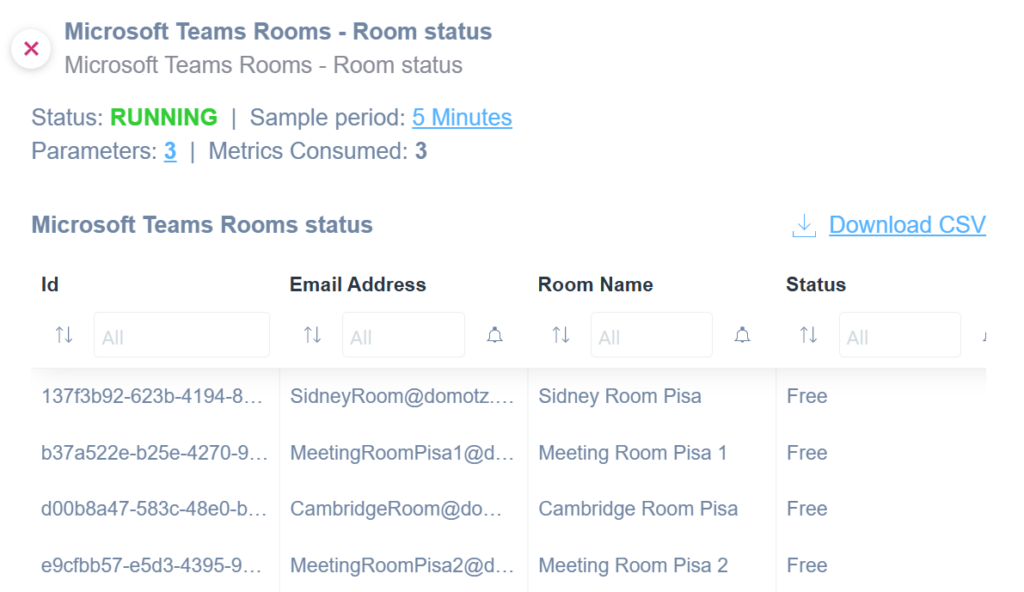
Microsoft Teams Room Status Overview
1. The status of the system is indicated as "RUNNING" with a sample period of 5 minutes.
2. There are 3 parameters and metrics consumed.
3. A table lists room details with columns: Id, Email Address, Room Name, and Status.
4. Under "Id," unique identifiers for each room are displayed.
5. "Email Address" shows the contact email for each room, like SidneyRoom@domotz.com.
6. "Room Name" provides the name of each room, such as Sidney Room Pisa.
7. "Status" indicates availability, with all rooms marked as "Free."
8. A "Download CSV" option is available to export the data.
- New script for monitoring ongoing meeting participants:
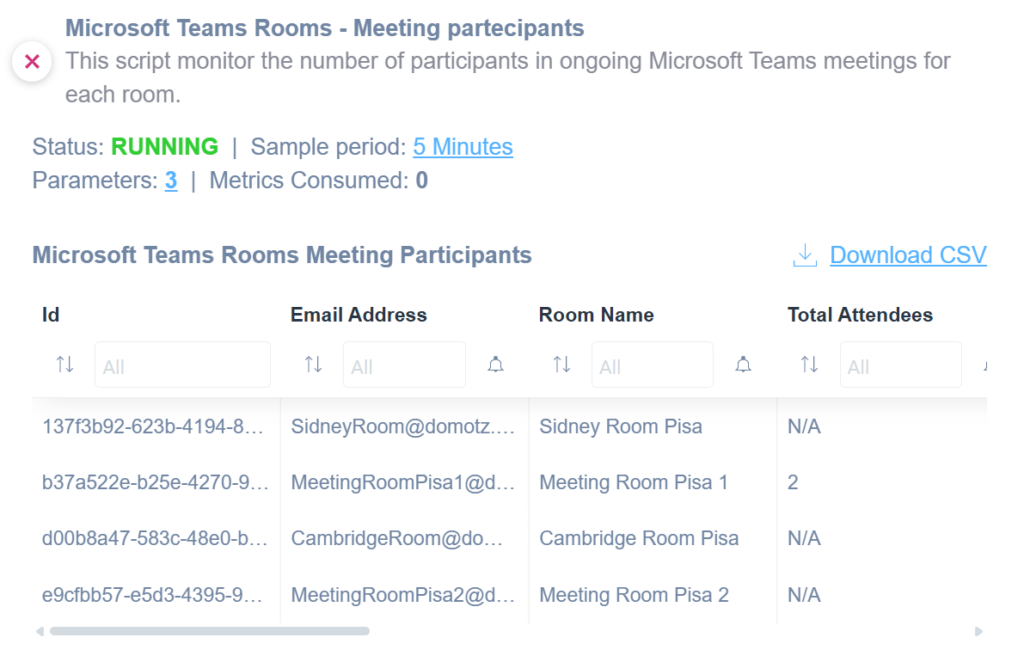
Microsoft Teams Rooms - Meeting Participants Overview
1. The script monitors the number of participants in ongoing Microsoft Teams meetings for each room.
2. Status is displayed as "RUNNING" with a sample period of 5 minutes.
3. There are 3 parameters and 0 metrics consumed.
4. A table lists meeting details with columns for Id, Email Address, Room Name, and Total Attendees.
5. Example entries include "Sidney Room Pisa" with no attendees, and "Meeting Room Pisa 1" with 2 attendees.
6. Users have the option to download the data as a CSV file using the "Download CSV" link.
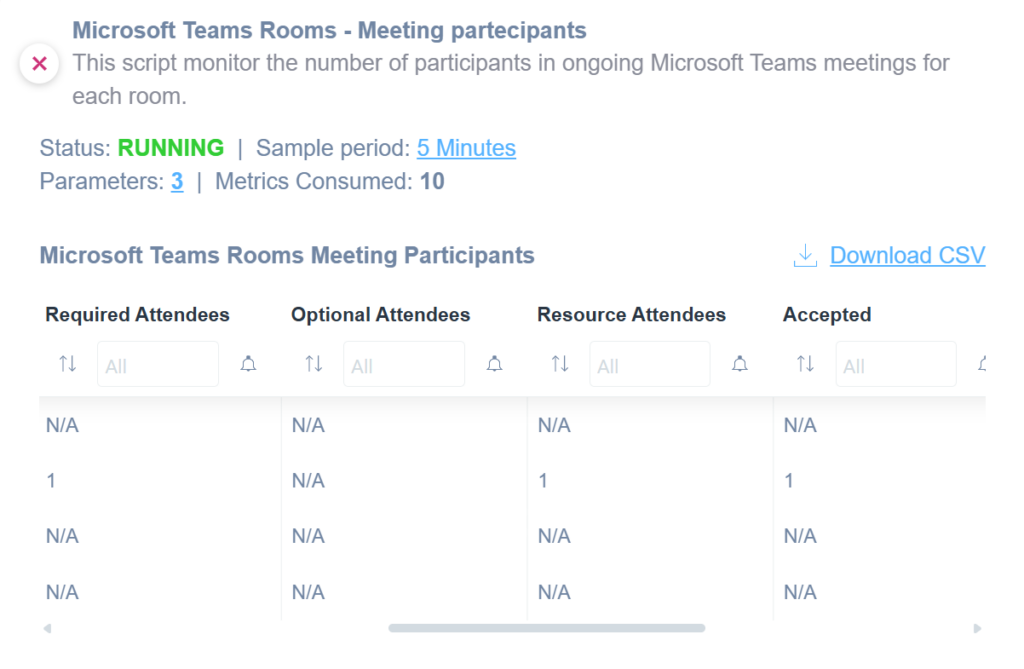
Monitoring Microsoft Teams Rooms Meeting Participants
1. The script monitors participant numbers in ongoing Microsoft Teams meetings.
2. Status is indicated as "RUNNING".
3. Sample period is set to 5 minutes.
4. Parameters in use: 3, with 10 metrics consumed.
5. The table displays columns for Required Attendees, Optional Attendees, Resource Attendees, and Accepted statuses.
6. Each column includes sorting and filtering options, shown as dropdowns labeled "All".
7. Some entries list participant counts or "N/A" where data is not applicable.
8. A "Download CSV" link is available to export the data.
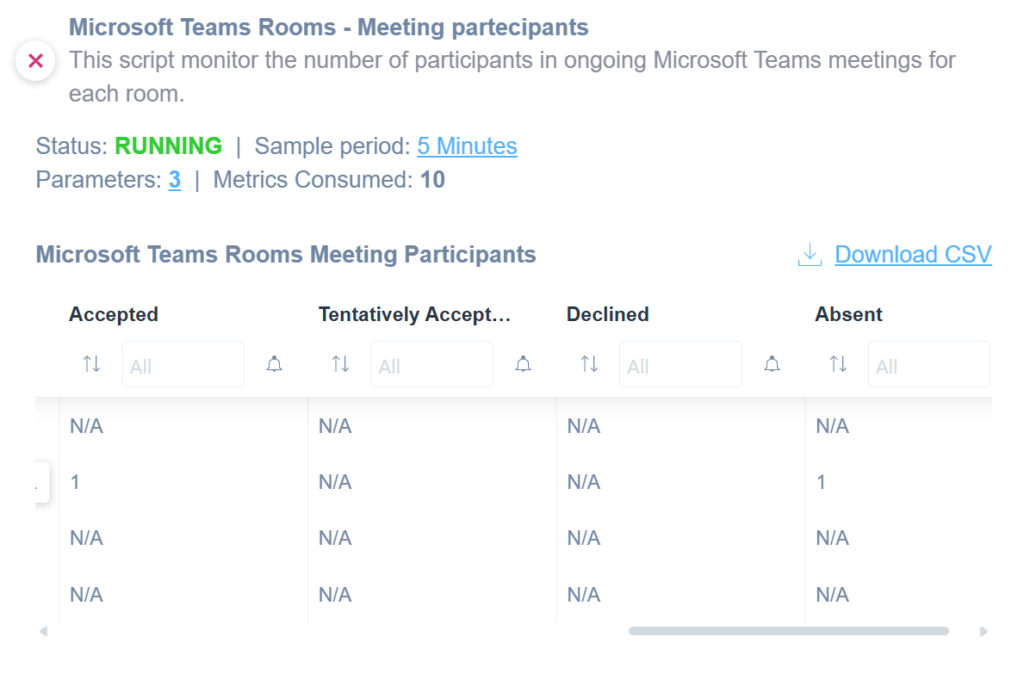
Microsoft Teams Rooms Meeting Participants Overview
1. The status of the script monitoring Microsoft Teams meetings is "RUNNING."
2. The sample period is set to 5 minutes, with 3 parameters and 10 metrics consumed.
3. The participant data can be downloaded as a CSV file.
4. The table shows participant statuses: "Accepted," "Tentatively Accepted," "Declined," and "Absent."
5. The first row under "Accepted" shows 1 participant; "Absent" also shows 1 participant. Other values are marked as "N/A."
- Added new metrics to Devices Status script (e.g. health, software update status, peripherals status, etc.).
Configuration Management
- Added support for Two Factor Authentication to SonicWall configuration backup script.
- New configuration backup scripts for the following devices
- Vyatta/VyOS
- EdgeSwitch
- Cisco IOS (through TFTP)
Documentation
- Improved reference guide structure and searchability.
New MIBs
- Netgear M4350 Switches
- VeloCloud
- Corning One Wireless Access Points
- Arista Switch
- ICT Modular Power Inverters
- NVR
- Netgear
Enhancements
Device Status Logic
- Offline status now displays only after the Offline Time Window elapses.
- Device status count now tracks only actual Online ↔︎ Offline changes.
- Added a separate Heartbeat Lost count on the Device List and Device Detail views.
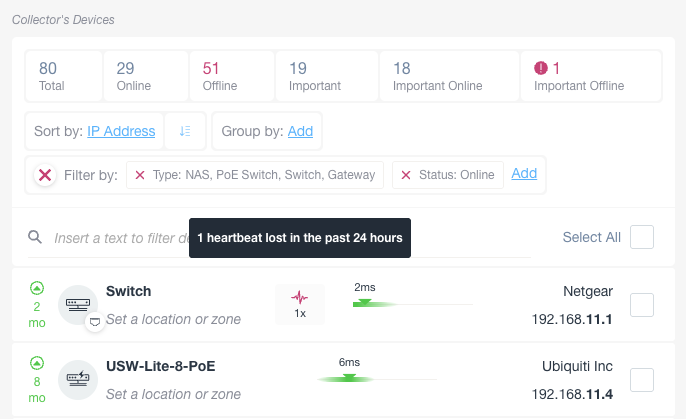
Device status overview and sorting options.
1. Header shows device status: 80 total devices, 29 online, 51 offline, 19 important, 18 important online, and 1 important offline.
2. Sort devices by IP Address or use Group by option to organize.
3. Apply filters: Type options include NAS, PoE Switch, Switch, Gateway. Status filter is set to Online.
4. Device list example:
- "Switch" device, last checked 2 months ago, with 1 heartbeat lost in the past 24 hours. Latency is 2ms, manufacturer is Netgear, and IP address is 192.168.11.1.
- "USW-Lite-8-PoE" device, last checked 8 months ago, with latency of 6ms, manufacturer is Ubiquiti Inc, and IP address is 192.168.11.4.
5. Options to select devices are available for further actions.
Explorer Performance
- Improved login time on Sites Explorer for all accounts, especially noticeable for larger accounts.
Monitoring Table Limits
- A new message is displayed on Monitoring Tables that have reached the technical limit for the number of devices or rows displayed.
Fixes
Collector and Script Fixes
- Fixed an issue where scripts were incorrectly disabled during platform issues.
- Fixed TFTP timeout in scripting framework.
- Fixed IP scan issues on routed networks.
- Fixed custom scripts using WinRM and getTLSCertificate functions.
Integration Fixes
- ConnectWise – Resolved an issue preventing new tickets from being created.
- Fresh Service – Failed validation for the “Agent” field preventing ticket creation is now resolved.
Dashboard and UI Fixes
- Network Topology
- Fixed an issue preventing deletion of manual links via direct selection.
- SNMP Custom OID Alerts
- Resolved trigger configuration issue for grouped interfaces.