
Overview
The Alert Dependency feature helps reduce ticket clutter and improve incident management when multiple connected devices in a network hierarchy go offline at the same time.
Domotz will detect when a parent device goes offline, and any child devices connected to it which are also offline, will be associated to the parent device as the cause of the outage. Instead of treating each device as an independent outage, Domotz evaluates the Parent-Child relationship and links events together.
For ITSM ticketing system integrations, this means tickets for the parent and child devices are automatically bundled together for easier management.
⚠️ Important in this release:
- Supported ticketing systems: ConnectWise and Halo PSA
- Alert Dependency affects ticket bundling only (notification message body is unchanged)
- UI available only when ConnectWise or Halo PSA integration is configured
- Notifications are not suppressed; both parent and child devices still generate alerts
Current Behavior (Without Alert Dependency)
- Domotz generates a separate alert notification for each device that goes offline.
- No Parent-Child relationships are considered, leading to multiple alerts and multiple tickets.
Behavior with Alert Dependency Enabled
When Alert Dependency is enabled:
- Topology is evaluated:
- Domotz uses the network hierarchy to determine whether any relationship exist for the offline devices.
- Tickets are bundled (ConnectWise and Halo PSA only):
- A parent ticket is created.
- Child tickets are created for dependent devices.
- Child tickets are linked automatically to the parent ticket in the ITSM system.
- Notifications remain unchanged:
- Domotz still sends separate alert notifications for each offline device.
- Message content is not modified in this release.
- The benefit is that in ConnectWise/Halo, tickets are grouped for visibility.
Configuration in the UI
The Alert Dependency feature is configurable only when ConnectWise or Halo PSA ticketing integration is active on the account.
- Alert Dependency Configuration UI: (Note: only available to roles with permission to manage Contact Channels)
- For account wide configuration, navigate to Alert Settings > Alert Dependency. Here the feature can be enabled and configured uniformly for all collectors in the account.
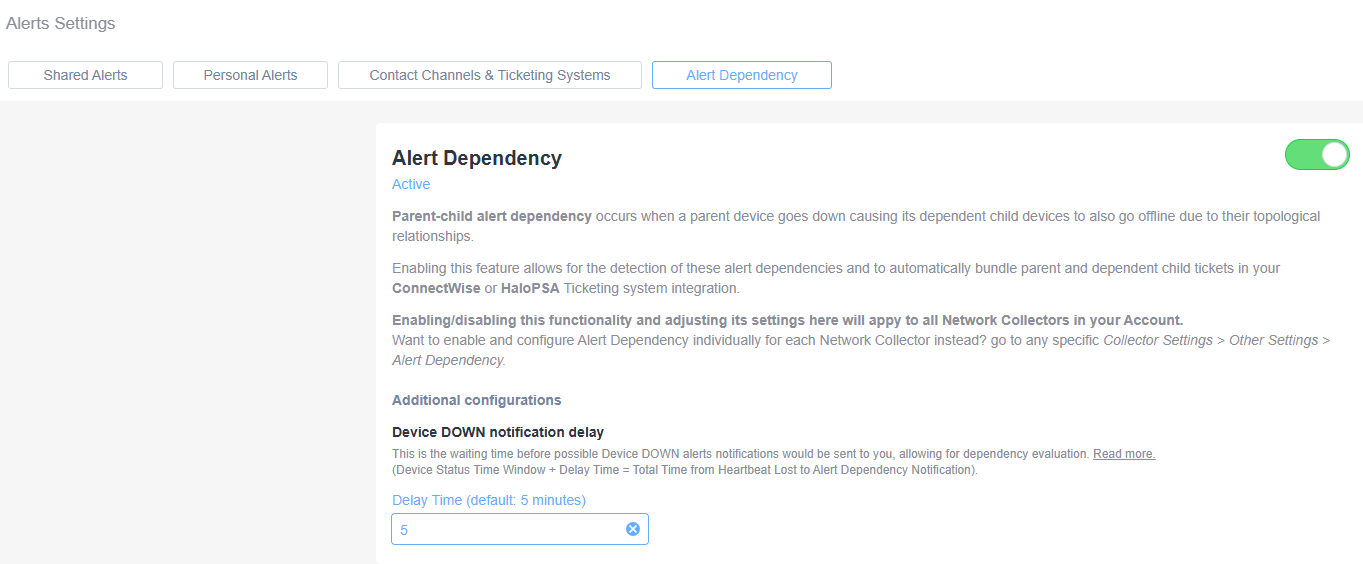
Alert Dependency Settings in Alerts Settings Panel
1. Navigate to the Alerts Settings panel, where you will find tabs for Shared Alerts, Personal Alerts, Contact Channels & Ticketing Systems, and Alert Dependency.
2. Click on the "Alert Dependency" tab to access settings related to alert dependencies.
3. To activate the alert dependency feature, ensure the toggle switch is set to "on" (green).
4. This feature manages parent-child alert dependencies, where a parent device failure causes dependent devices to also go offline.
5. It integrates with ConnectWise or HaloPSA to manage and organize related alert tickets.
6. The setting applies globally to all Network Collectors within your account. To configure individually, navigate to Collector Settings > Other Settings > Alert Dependency.
7. Additional configurations are available for adjusting the Device DOWN notification delay. This sets how long the system waits before sending alerts following a device downtime.
8. Change the notification delay time by entering a value in minutes, with the default being 5 minutes.
9. Click "Read more" for detailed documentation on delay calculation and other related information.
- For collector level configuration, navigate to the collector settings page > Other Settings > Alert Dependency Configuration. Here the feature can be enabled and configured for a given collector.
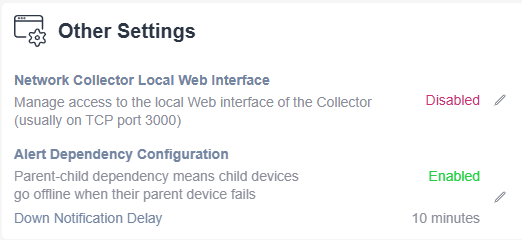
Other Settings Interface Overview
1. **Network Collector Local Web Interface**: Displays whether the web interface access is enabled or disabled. Currently, it is set to "Disabled." This setting manages access to the local web interface of the Collector on TCP port 3000.
2. **Alert Dependency Configuration**: Indicates whether alert dependencies are enabled. Currently, it is set to "Enabled." This configuration ensures child devices go offline when their parent device fails. There is a "Down Notification Delay" set to 10 minutes.
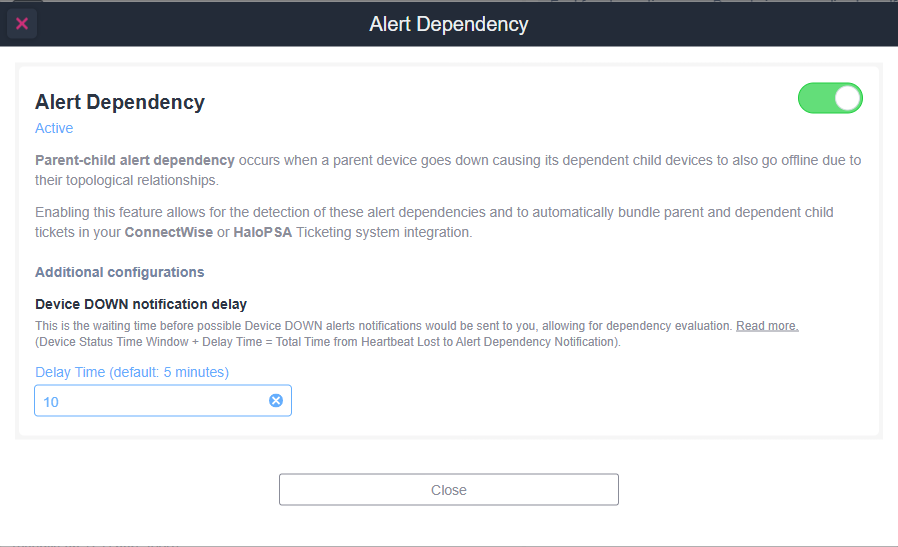
Alert Dependency Settings Panel
1. Title: "Alert Dependency" with a toggle switch set to active, indicated by a green position.
2. Description: Explains "Parent-child alert dependency," where child devices go offline if a parent device does. This is to manage device relationships and alert systems.
3. Integration: Notes that this feature integrates with ConnectWise or HaloPSA for ticketing system alerts.
4. Additional Configurations: The section covers "Device DOWN notification delay," detailing the setup for alerts when a device goes down.
5. Delay Time: Default is 5 minutes, adjustable via a field showing "10." This represents the waiting time before an alert is issued.
6. Close Button: Located at the bottom to exit the panel.
- For account wide configuration, navigate to Alert Settings > Alert Dependency. Here the feature can be enabled and configured uniformly for all collectors in the account.
- Alert Dependency Enablement and Configuration:
- Use the toggle to enable/disable the feature.
- Device DOWN notification delay setting: This is the waiting time before Device DOWN event notifications will be sent, allowing for dependency evaluation. Read More (Device Status Time Window + Delay Time = Total Time from Heartbeat Lost to Alert Dependency Notification). The default delay is 5 minutes with a minimum delay of 1 minute. Example: If a parent router and five child switches go offline at the same time, Domotz waits for the configured delay, then creates a parent ticket and bundles all child tickets under it.
- Use the toggle to enable/disable the feature.
Ticket Autoclose Behavior
If autoclose is enabled for the ticketing system the behavior varies depending on which ticketing system is used:
- ConnectWise: Because ConnectWise will close all child tickets when a parent ticket is closed via the API, all child tickets are unbundled from the parent ticket prior to the autoclosure of the parent ticket. This ensures that child tickets for devices which remain offline after a parent device comes back online are not closed automatically by ConnectWise when the parent ticket is closed. The body of the child tickets is updated to note the parent ticket to which it was attached prior to being unbundled from the parent.
- Halo PSA: If the parent device comes back online but all the child devices are not yet online, then only those tickets for devices which have come back online and generated a device UP event notification will be closed. In the scenario where child devices take longer to come back online and generate an UP notification than the parent device, the parent ticket may be closed with some child tickets remaining open.
It is also possible that a child device will come back online and generate an UP notification before the parent device, in which case the parent ticket will remain open when some or all of the child tickets have been closed.
Example Alert Dependency Workflow
Refer to the network segment below for the explanation for how Event Dependency evaluates device topological relationships and bundles parent and child tickets in the ConnetWise or Halo PSA ticketing systems.
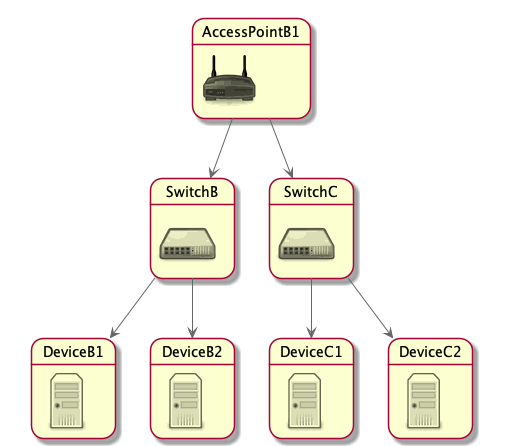
Network topology diagram for AccessPointB1.
1. AccessPointB1 is at the top, functioning as the central node.
2. Below are two switches: SwitchB and SwitchC, connected to AccessPointB1.
3. SwitchB is linked to two devices labeled DeviceB1 and DeviceB2.
4. SwitchC connects to DeviceC1 and DeviceC2.
This diagram illustrates the hierarchical structure of the network, with AccessPointB1 distributing connections to SwitchB and SwitchC, which in turn connect to individual devices.
In this scenario
- The parent switch device goes down (SwitchB)
- All the child devices linked to the parent device (DeviceB1 & Device B2) go down within the Offline Delay Time Window
- NOTE: It does not matter in what order the parent and child devices go down. As long as they all go down within the Offline Delay Time Window the events will be linked and the parent and child tickets will be bundled in the ConnectWise or Halo PSA ticketing system.
Alert Dependency behavior:
- A ticket for the parent switch is created
- Tickets for all the child devices are created and linked to the parent ticket in ConnectWise or Halo PSA ticketing systems.
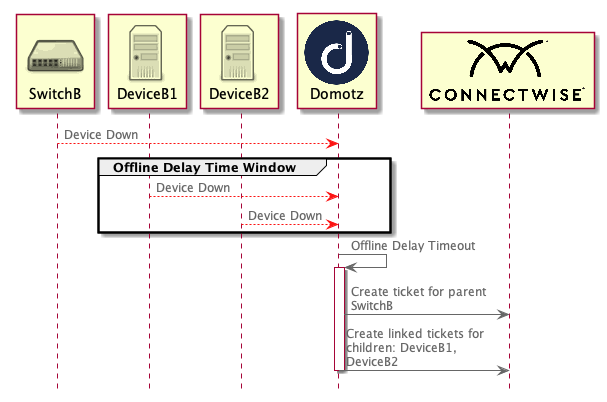
Network Monitoring and Ticketing Workflow
1. When "SwitchB," "DeviceB1," and "DeviceB2" all go offline, they trigger an "Offline Delay Time Window."
2. If the devices remain down past the "Offline Delay Timeout," a ticket is created for the parent device "SwitchB."
3. Simultaneously, linked tickets are created for child devices "DeviceB1" and "DeviceB2."
4. This process is integrated with "Domotz" and "ConnectWise" for network and service management.