
Big things are coming to Domotz. Over the coming weeks, we’re rolling out updates that give you more flexibility and control over access and alerts:
- Precise control over access. Decide exactly which features, settings, Collectors and dashboards each user can reach.
- A better way to collaborate. Bring in partners, contractors and clients, with access tailored to each person.
- Smarter alerting. Unified Alerts brings all your alert configuration into one place, with severity levels, live alert history and Maintenance Windows.
Most changes happen automatically, and everyone keeps their current access. We’ll notify you and update this article as each date approaches.
| Update | Applies to | Timing |
|---|---|---|
| Roles Are Becoming Access Sets | Domotz accounts already using role-based access control (RBAC) | October 28, 2026 |
| A New Collaboration Experience | Domotz accounts using RBAC, and later Domotz accounts using Collaboration today | Coming soon |
| All Domotz Accounts Are Moving to RBAC | Domotz accounts not yet using RBAC, except those using Collaboration or Company Structure | Coming soon |
| Unified Alerts and Maintenance Windows | All Domotz accounts using RBAC | Coming soon |
Roles Are Becoming Access Sets
On October 28, 2026, roles will be replaced by Access Sets for Domotz accounts already using RBAC.
Today, a single role defines both the account-wide features and settings a user can access, and the Collectors and dashboards they can work with. Access Sets split these into two types you can mix and match:
- Account Access Sets: which features and settings a user can access, such as user management, billing, profiles or integrations.
- Resource Access Sets: which Collectors and dashboards a user can access, and what they can do with them.
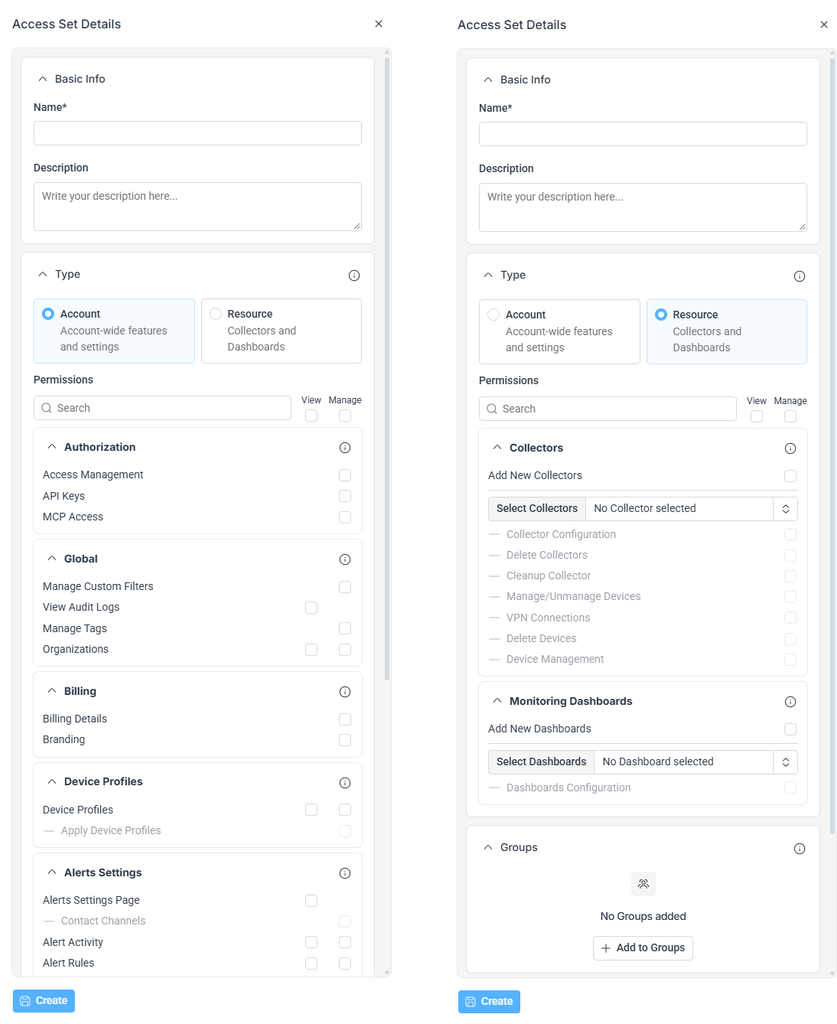
With Access Sets, you can:
- Create one Account Access Set for a job, such as technician, and assign it to everyone in that job. Then give each technician a Resource Access Set with only the Collectors they work on.
- Assign several Access Sets to a user, directly or through their groups, and they get all of their permissions combined
- New: Assign Access Sets directly to a user, without creating a group first
Good to Know
- A Resource Access Set applies the same permissions to everything in it. For different permissions, use more than one: for example, view-only for Collector A and full management for Collector B.
- Features involving Collectors, devices or dashboards only apply to the ones a user’s Resource Access Sets include.
What Happens to Your Existing Roles
On October 28, 2026, we’ll automatically split each role into two Access Sets with the same name as the role:
- An Account Access Set with the role’s account-wide permissions
- A Resource Access Set with the role’s Collectors, dashboards and permissions on them
Both are assigned to the same users and groups. No one’s access will change, and there’s nothing you need to do.
Have questions? Email support@domotz.com or click the help icon in Domotz and select Share feedback.
A New Collaboration Experience
RBAC will soon get a new Collaboration experience for working with users outside your organization. You’ll be able to invite users who already have a Domotz account to collaborate on yours. We’ll share the release date as it gets closer.
Already using Collaboration? We’ll move your Domotz account to RBAC at a later date and let you know beforehand. Every Collaborator keeps their current access, but how they reach your Domotz account and how you manage them will change. See what’s different from Collaboration today. Support Team accounts are excluded from this move.
With the new Collaboration experience, you’ll be able to:
- Give each Collaborator access to specific Collectors or to your full Domotz account
- Switch between your own Domotz account and the ones you collaborate on, using the account switcher
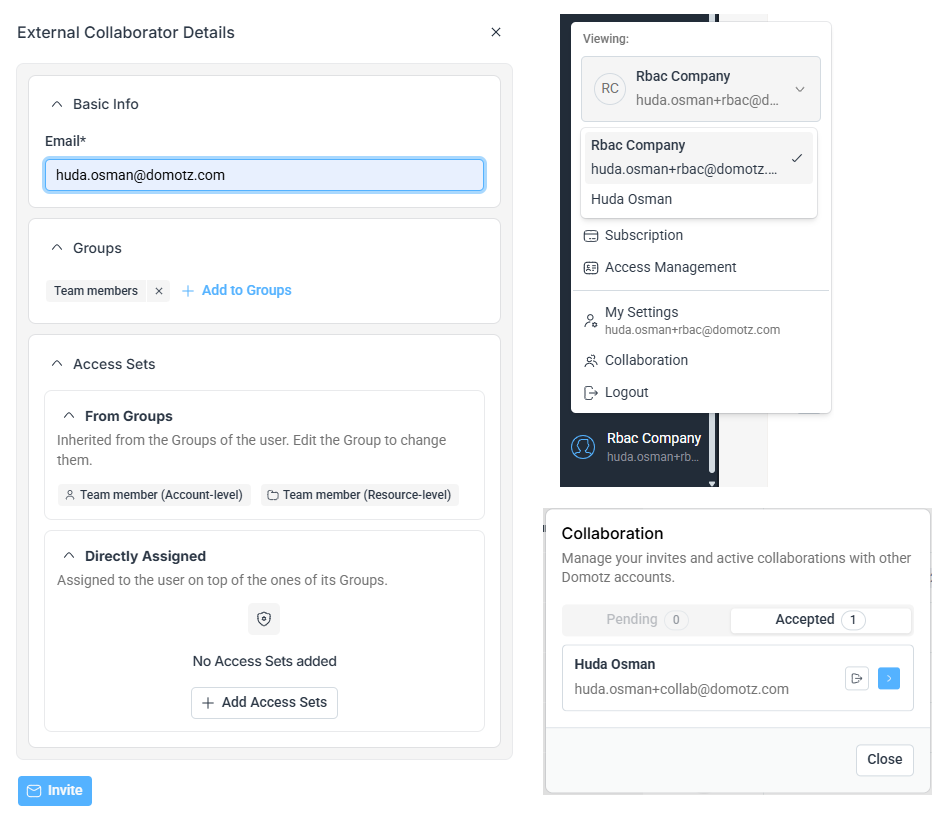
What’s Different from Collaboration Today
To keep shared access secure, a few things will work differently:
- Tighter control over what each Collaborator can access. Invite Collaborators individually instead of as a whole team, and give each one only the access they need.
- Each Domotz account is viewed separately. Collectors from different accounts no longer appear together. Use the account switcher to move between them.
- Only admins can manage Collaborators. Inviting and managing Collaborators requires the Access Management permission.
- Collaborator activity is recorded in your Audit Log, so you have a clear record of who did what.
Have questions? Email support@domotz.com or click the help icon in Domotz and select Share feedback.
All Domotz Accounts Are Moving to RBAC
Soon, we’ll automatically move all Domotz accounts still using Team Management to Role-Based Access Control (RBAC), where Team Management is replaced by Access Management. Moving to RBAC also gives you Unified Alerts and Maintenance Windows. We’ll share the date as it gets closer.
How Your Users Will Be Migrated
| In Team Management | After the move to RBAC |
|---|---|
| Account Owner | Added to the Administrators Group, with full access |
| Team Members | Added to the Team Members Group, with the same permissions they have today |
| Field Operators | Keep access to the same Collectors they’re assigned to today |
We’ll also create default Groups and Access Sets, such as Administrators, Team Members, Read-Only, Billing and Manager, which you can edit or replace. No one’s access will change, and there’s nothing you need to do.
Domotz Accounts That Won’t Be Moved Yet
- Accounts using Collaboration: whether you invite Collaborators or are invited to collaborate, we’ll move your Domotz account to RBAC later, where you’ll get the new Collaboration experience. Until then, nothing changes.
- Accounts using Company Structure: these won’t be moved automatically. To move to RBAC and use Unified Alerts, contact our support team.
Have questions? Email support@domotz.com or click the help icon in Domotz and select Share feedback.
Unified Alerts and Maintenance Windows
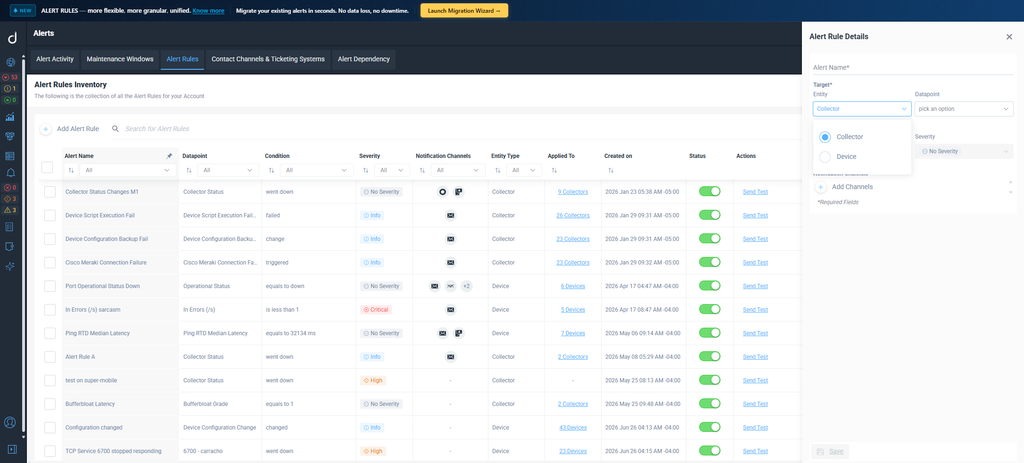
Once every Domotz account has moved to RBAC, we’ll turn on Unified Alerts for everyone. Unified Alerts is our new alerting system, bringing all your alert configuration into one centralized experience, with scheduled Maintenance Windows at the Collector and device level, in-app alert activity and more. You’ll be able to:
- Manage all alert rules in one place, at the account, Collector and device level
- Prioritize alerts with severity levels
- Roll out alerts faster with Device Profiles and bulk actions
- Track active and resolved alerts in Alert Activity
- Get notified by mobile push, email, SMS, ticketing systems and custom webhooks
- Alert on more events, with more alerts in the works based on your feedback
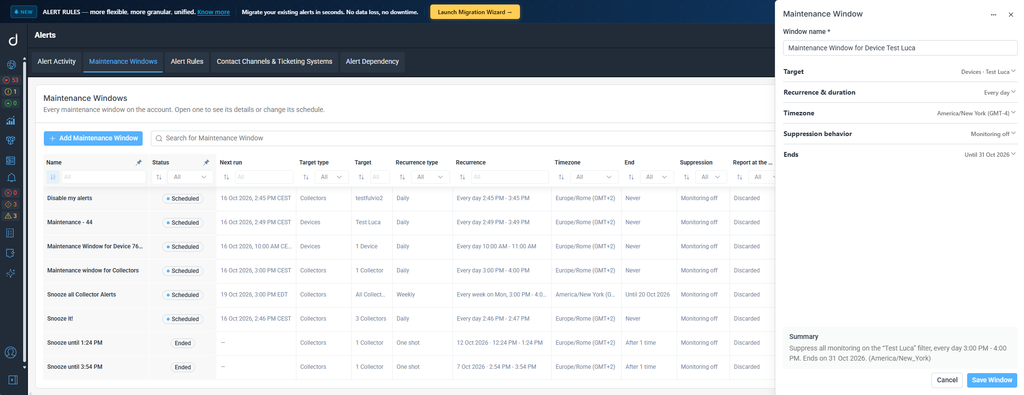
Maintenance Windows let you schedule planned work and pause alerts for entire Collectors or specific devices, picked one by one or with dynamic filters.
Migrating Your Personal and Shared Alerts
Your existing alerts keep working alongside Unified Alerts until you migrate them.
- Carried over automatically: Alert Dependency rules, and sensor and driver metric alert rules.
- Migrated when you’re ready: Personal and Shared Alerts, using the migration wizard.
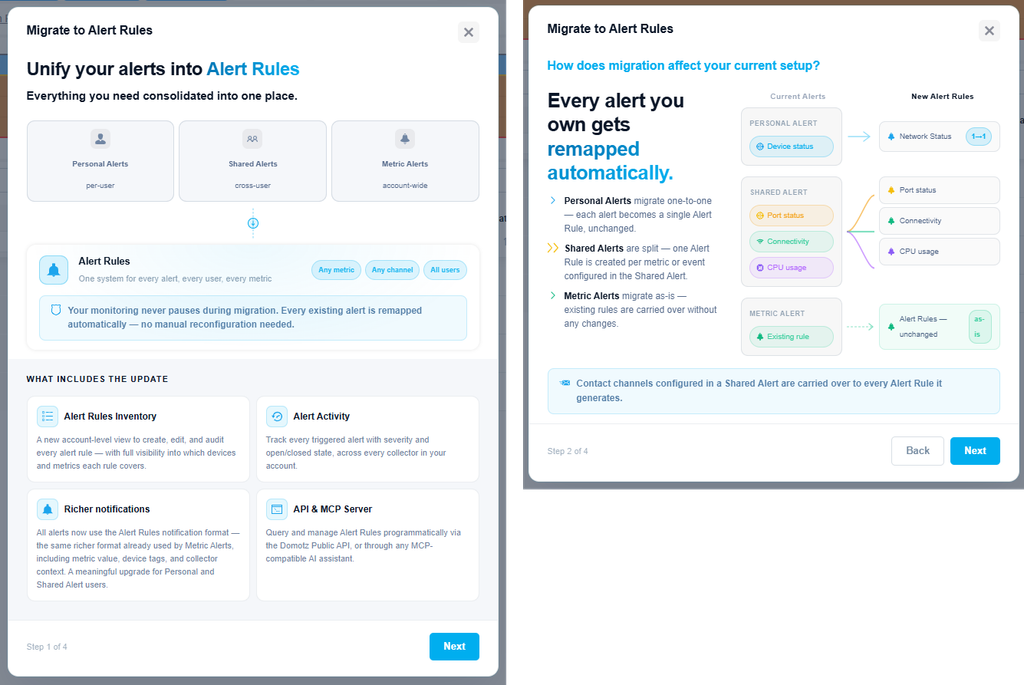
Tip: If a new Unified Alerts rule covers the same condition as an existing alert, check its notification channels to avoid duplicate notifications.
Learn more about Unified Alerts
Have questions? Email support@domotz.com or click the help icon in Domotz and select Share feedback.
Frequently Asked Questions
Do I need to do anything to prepare?
No. Most changes happen automatically. Later, you’ll migrate your Personal and Shared Alerts to Unified Alerts whenever it suits you.
Will anyone lose access?
No. Everyone keeps the access they have today, including Field Operators and External Collaborators.
Will my alerts change?
No. Your Personal and Shared Alerts keep working alongside Unified Alerts until you migrate them with the wizard.
How will I know when each change happens?
We’ll notify you in Domotz and update this article as each date approaches.
Who can I contact with questions?
Email our support team at support@domotz.com, or click the help icon at the top right of any page in Domotz and select Share feedback.