
Domotz, by default, scans the following ports on every device, in order to provide a list of open ports available on each device.
TCP Ports
21 (FTP)
22 (SSH)
23 (TELNET)
25 (SMTP)
53 (DNS)
79 (FINGER)
80 (HTTP)
110 (POP3)
135 (VMI)
139 (Netbios)
143 (IMAP and IMAP StartTLS)
179 (BGP)
194 (IRC)
220 (IMAP3)
389 (LDAP)
443 (HTTPS)
445 (SMB)
548 (AFP – Apple Filing Protocol)
587 (SMTP – StartTLS)
625 (Open Directory)
993 (IMAP – SSL)
995 (POP3 – SSL)
1433 (Microsoft SQL)
3000 (Domotz)
3306 (MySQL)
3389 (RDP)
5000 (UPnP)
5432 (Postgres)
5900 (VNC)
5985 (WinRM)
8000 (alternate HTTP)
8001 (alternate HTTP)
8080 (alternate HTTP)
8888 (alternate HTTP)
9389 (Active Directory)
27017 (MongoDB)
UDP Ports
53 (DNS)
67 (DHCP)
123 (NTP)
161 (SNMP)
SSH Protocol Ports Customization
Some devices expose their services on non-standard ports. From the Collector’s Monitoring Configuration you can define a custom SSH port that applies to all the devices of that Collector, instead of relying only on the standard port 22.
Where to find this setting
- From the Collectors list, select the Collector you want to configure.
- Once in the Collector’s Devices view, click the Collector tab in the top menu.
- Scroll to the Monitoring Configuration section.
- Locate the Port Scanning area.
- Next to SSH – 22, enter the additional port you want Domotz to scan (e.g. 2222), then save.
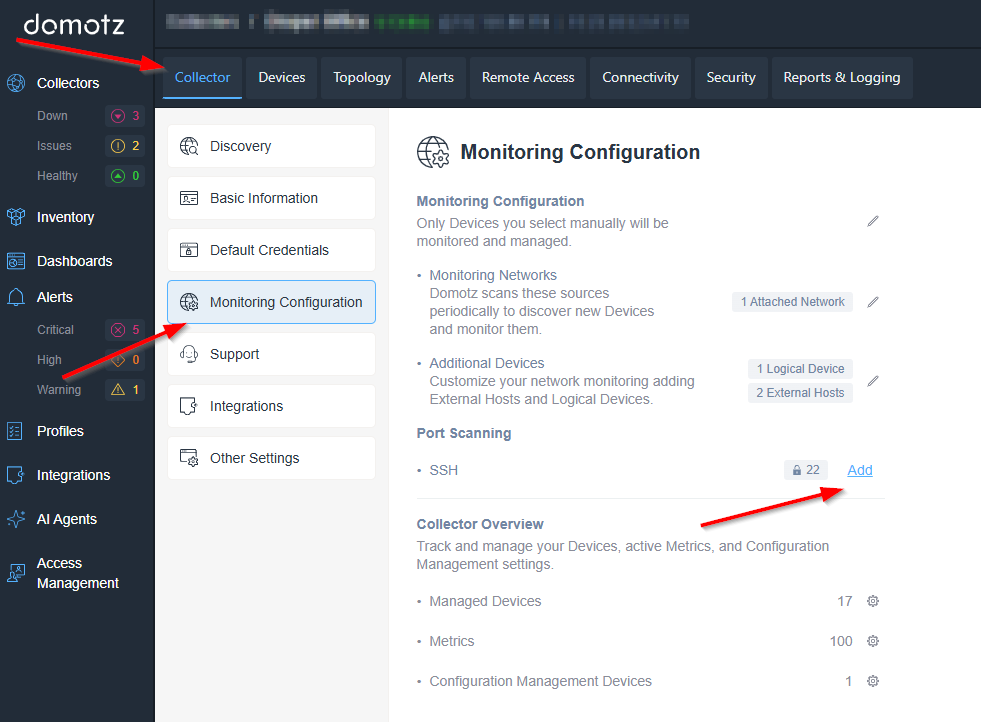
Accessing the Monitoring Configuration in Domotz
1. In the Domotz dashboard, select "Collector" from the top navigation menu.
2. From the left sidebar, choose "Monitoring Configuration" under the "Collectors" section.
3. The "Monitoring Configuration" page includes the following:
- "Monitoring Networks" to scan sources and discover new devices.
- Options to add logical devices and external hosts for additional monitoring.
- "Port Scanning" section where you can configure settings such as SSH. Click "Add" to modify these settings.
4. The "Collector Overview" section provides metrics for managed devices, metrics, and configuration management devices with corresponding quantities.
Please note
- Only one custom port can be defined at the moment.
- SSH is the only protocol currently supported.
- Port 22 is always scanned, regardless of the custom port you configure. The custom port is scanned in addition to it, never instead of it.
- The setting applies to all the devices monitored by that Collector, not to a single device.
Configuring the custom port via the Public API
The same value can be set programmatically:
PUT /agent/{agent_id}/service-port/{service_port_protocol}
curl https://api-eu-west-1-cell-1.domotz.com/public-api/v1/agent/{collector-id}/service-port/SSH \
  --request PUT \
  --header 'Accept: */*' \
  --header 'Content-Type: application/json' \
  --header 'X-Api-Key: <YOUR_API_KEY>' \
  --data '{
  "port": 2222
}'
Replace {collector-id} with the ID of your Collector and use the API endpoint matching your account’s region. The port 2222 is only an example — enter the SSH port actually in use on your devices.
Public API link: https://portal.domotz.com/developers/#tag/network-configuration/PUT/agent/{agent_id}/service-port/{service_port_protocol}
Where will I see the available services?
The discovered services will be available on each device in the “Info” tab under “Services” section:
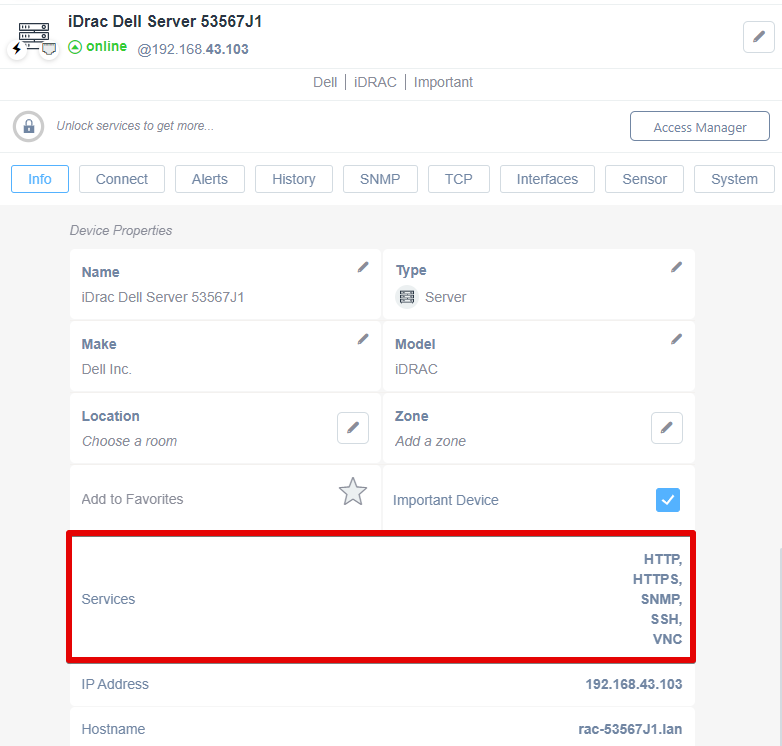
iDrac Dell Server Dashboard Overview
1. The page displays the details of an iDrac Dell Server, model 53567J1, currently online with the IP address 192.168.43.103.
2. Tabs available for selection include Info, Connect, Alerts, History, SNMP, TCP, Interfaces, Sensor, and System.
3. Device Properties section lists:
- Name: iDrac Dell Server 53567J1
- Type: Server
- Make: Dell Inc.
- Model: iDRAC
- Location and Zone fields for room and zone assignment, both editable.
4. Options to add the server to Favorites and mark it as an Important Device.
5. Services provided include HTTP, HTTPS, SNMP, SSH, and VNC, highlighted and accessible on the server.
6. IP Address is shown as 192.168.43.103 with the hostname 'rac-53567J1.lan'.
And also in the the “Connect Tab” of your device.
For this feature please see the following kb article:
https://help.domotz.com/user-guide/remote-connection-https-rdp-telnet-ssh-tcp-tunnels/